In this release, we are introducing a new reversal process for Payments and Receipts.
This update aims to reduce the manual work currently required to reverse transactions while also enhancing the useful information available in these screens.
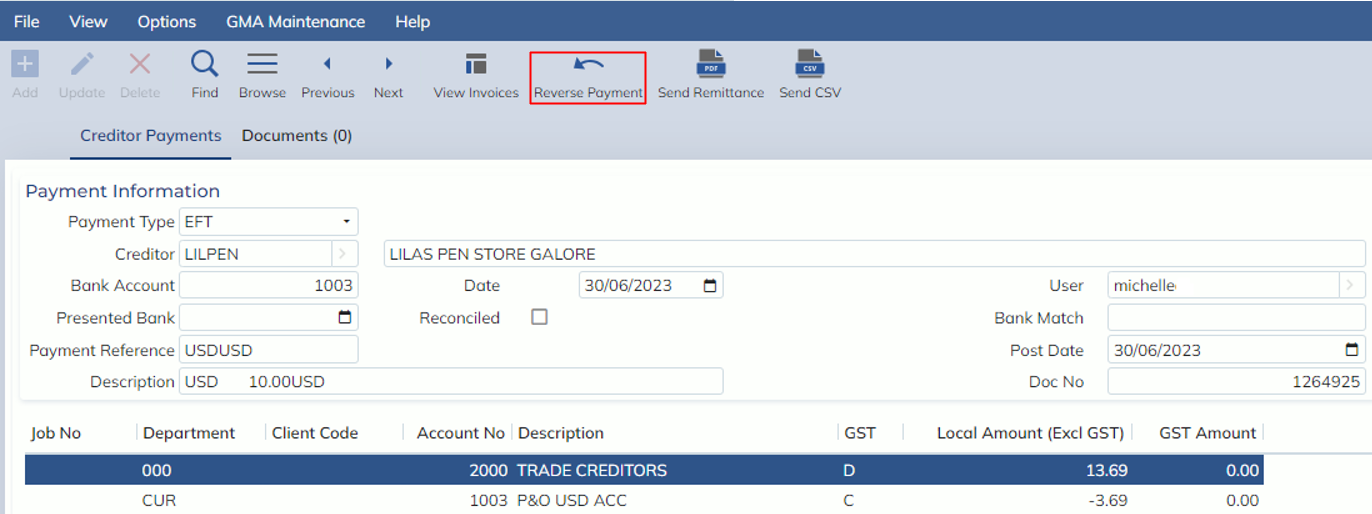
The reversal button will be available in the following screens:
- Payments Enquiry (Finance -> Banking -> Enquiry -> Payments Enquiry)
- Receipts Enquiry (Finance -> Banking -> Enquiry -> Receipts Enquiry)
Payments Enquiry:
Receipts Enquiry:
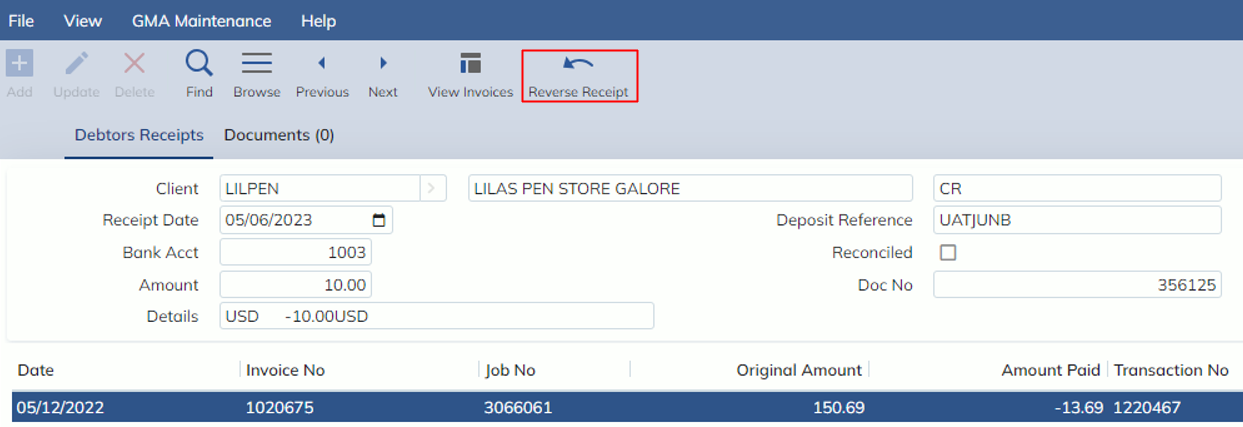
Users can restrict access to these reversal buttons through a new User Option, accessed from the Users Masterfile under Options->User Options:
- CREDPAYREV (Payment Reversal)
- DEBRECREV (Receipt Reversal).
If you would like to revoke ALL access to the reversal function, please contact Expedient Software team with the above User Option codes to remove all access.
Important Note:
Not all payments and receipts can be reversed. If you hover your cursor over the greyed-out ‘Reverse’ button, a tooltip will appear with the reason the button is disabled.
Payments/Receipts cannot be reversed when:
- User does not have permission
- Payment/Receipt has been reconciled
- Payment/Receipt has been reversed
What happens when I reverse a Payment or Receipt?
The ‘Reverse’ function works by automatically creating an identical payment or receipt using the inverse
amounts. This reversal transaction can be identified by the ‘Reversal Payment’ or ‘Reversal Receipt’ description on the record. The reversal payment/receipt will use the date of reversal (TODAYS DATE) as the Payment/Receipt Date.
The auto-create payment/receipt will also be auto-posted and reconciled.
NOTE: As soon as a payment or receipt is reversed, the original transaction I am reversing will be updated with a reversal indicator. This indicator (a checkbox) also has a date and user field to show when and who reversed the transaction.
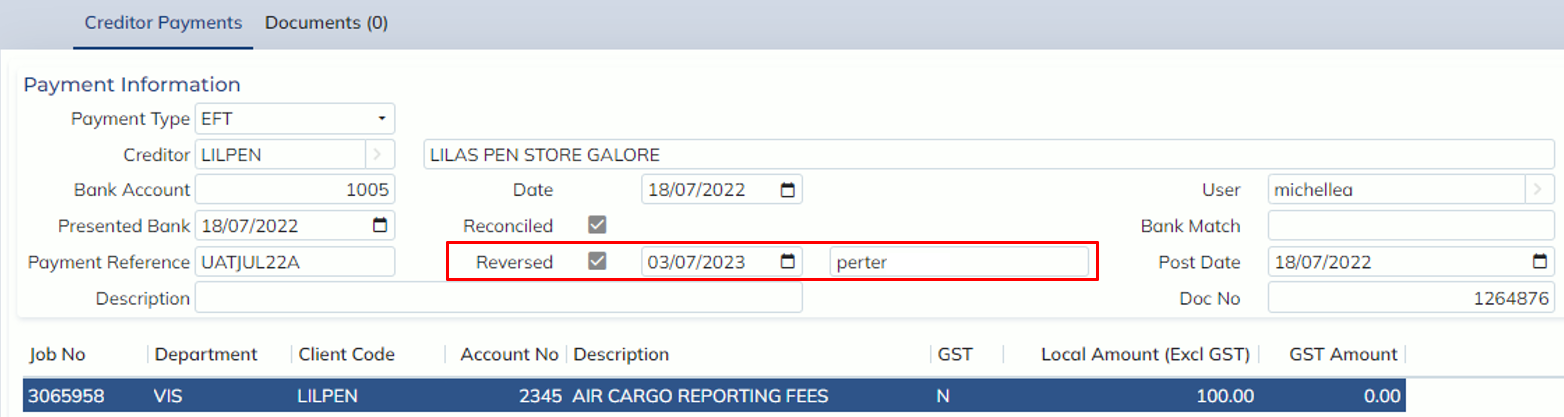
For example:
I have a Creditor Invoice for $100 that contains 2 part-payments: Payment 1 = $40.00 and Payment 2 = $60.00
I have mistakenly entered the wrong date against the invoice. I cannot reverse the invoice, as there is now money allocated against it.
I go to the Payments Enquiry screen and find the 2 part-payments.
I already have permission set up, so I can simply select the ‘Reverse’ button against Payment 1. As soon as I have reversed it, I can see that my Payment record now has a reversal indicator, letting me know I have reversed it.
When I check my invoice, I can see the balance for outstanding amount has been increased from 0.00 to $40 and the status of the invoice has changed from PAID to PART-PAID.
I go and reverse Payment 2 and the invoice has once again changed to now show an outstanding balance of $100.
I can now reverse the invoice or re-pay it.