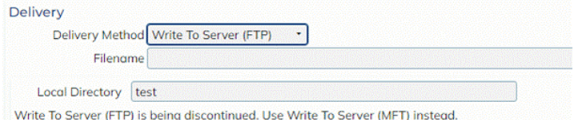
This release, we are taking a step towards updating our security by switching out some screens using the Write to Server (FTP) delivery method and changing to either the Write to Server MFT or SFTP.
Why are we making this change?
As part of our ongoing goal of increasing security, we are updating many areas of the system. We believe by slowly making the swap from Write to Server (FTP) to either Write to Server (MFT) or SFTP, we will be working towards achieving this goal.
What screens will this apply to?
The following screens will have this update applied:
-
-
- Report Scheduling -> User Configured Report Scheduling
- Report Scheduling -> Shelved Report Scheduling
- Order Management -> Reports -> Import -> Report Scheduling – User Configured
- Order Management -> Reports -> Export -> Report Scheduling – User Configured
- Management -> Reports -> Finance -> Accounting Report Scheduling
-
How will this affect me?
Any reports being sent from one of the above screens currently using the Write to Server (FTP) delivery method will still run and be available as normal, however the next time users go to update one of these documents, they will be forced to switch from Write to Server delivery method to either Write to Server (MFT) or SFTP, depending on whether they are currently operating on their own server or using an Expedient server.
- Clients who are on their own server will be making a direct swap from Write to Server FTP to Write to Server MFT.
- All directory information will be copied across without the user’s direct input.
- Clients who are operating using an Expedient server will make a swap from Write to Server FTP to SFTP.
- Clients with existing Write to Server report records have been contacted with this change and presented with their SFTP details to enter. If you have not received any information or would like to set this up for the first time, please contact Expedient Support to get set up with SFTP.
When users change the Delivery Method from Write to Server (old) to either MFT/SFTP, you will see new enhancements:
Before:
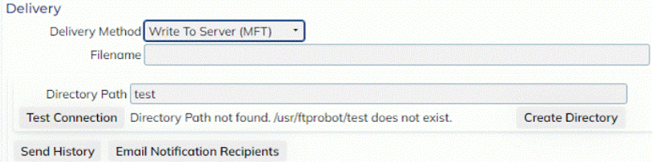
New (MFT)
What other enhancements have been made?
Users will now be able to better track their outbound files as well as more easily test server connections with the following enhancements:
-
-
- ‘Test Connection’ button: When a Directory Path is entered, selecting ‘Test Connection’ will check to see if the path exists. The result of this check will be displayed on screen.
- This button is also available for SFTP, with the Test Connection slightly more in-depth (a log screen will be opened to display the result of the check)
- ‘Create Directory’
- As you can see above, when the Directory Path is not found (has not been created), users can simply select the ‘Create Directory’ button to auto-create the directory on the spot
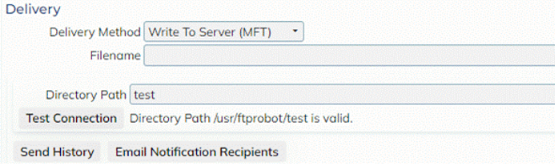
- Selecting the Test Connection after this will show that the new directory path is valid
-
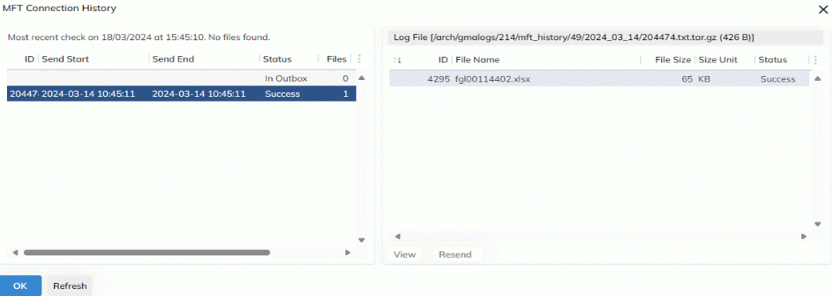
- Send History
- This is a modal displaying the history of files being send, both historically (available for 30 days) as well as currently being sent
- Users can download these files as well as resend them from this modal
- Users can also check the log of the file send
-
- ‘Test Connection’ button: When a Directory Path is entered, selecting ‘Test Connection’ will check to see if the path exists. The result of this check will be displayed on screen.
-
-
-
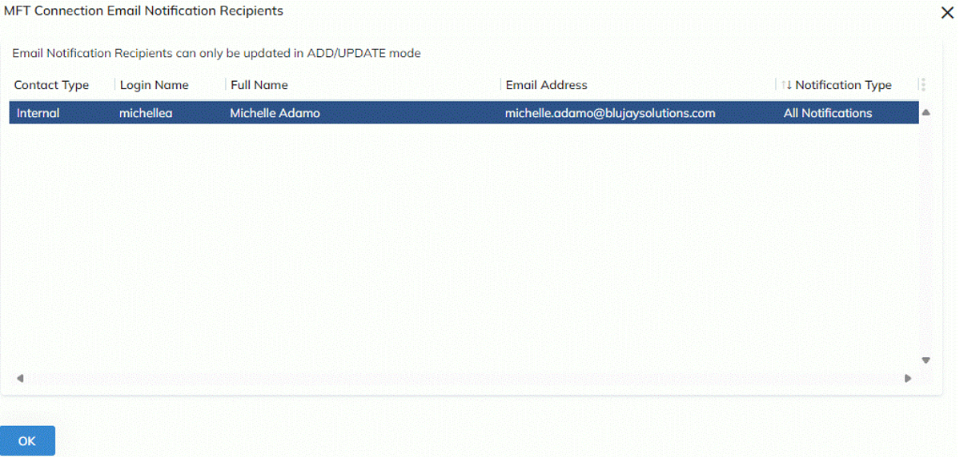
- Email Notification Recipients
- Users can add recipients to receive notifications for files being sent
- Users can choose to receive Error, Success or All Notifications
- Users can choose whether the recipient you are adding is an internal user (is an Expedient user) or external (no email address saved in the system to select)
-
- Email Notification Recipients
-