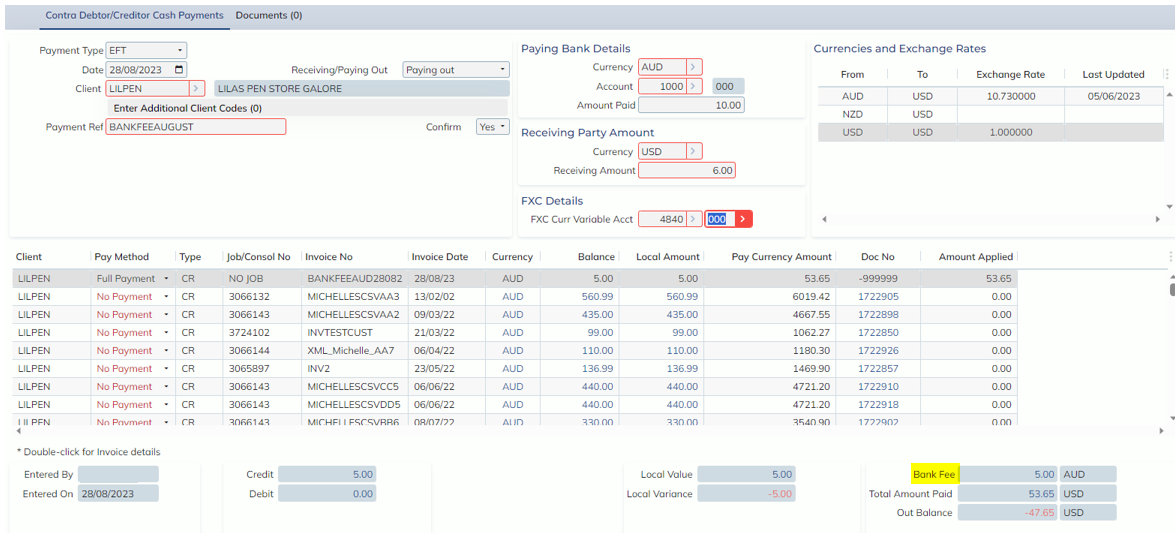
In this release, we have enhanced the Foreign Contra screen to now allow the easy adding of Bank Fees.
The Foreign Contra screen has a new button in the toolbar called ‘Bank Fees’.
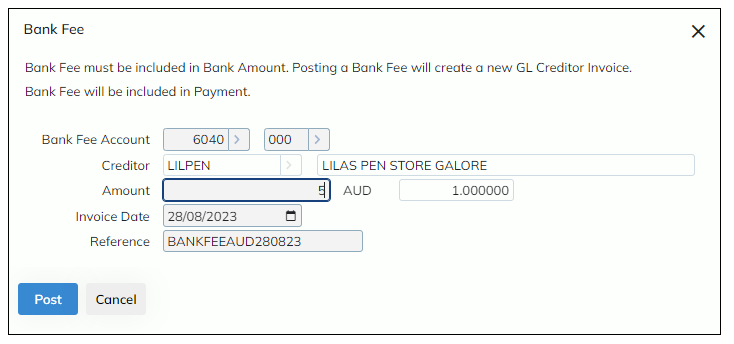
Selecting this button will allow users to include a bank fee in their Payment/Receipt, by automatically creating a GL Creditors Invoice using the details applied in the new Bank Fees modal.
When a Bank Fee is added, a greyed-out, non-editable invoice line representing the Bank Fee is inserted into the invoice list. NOTE: if this Payment record is deleted, no Bank Fee invoice will be created.
Bank Fee details and amounts can be adjusted from within the Bank Fees modal.
A new Bank Fees total has been added to the bottom right of the screen. NOTE: the existing ‘Total Applied’ includes bank fees.
As the Foreign Contra screen has also been updated to accommodate the Bank Fee with the following updates:
- A new Bank Fees total that will appear in the bottom right corner when a bank fee is posted
- Allowance of different Bank Details Amount and Pay Details Amount when both groups have the same currency
- Now the system will check if there is a bank fee inserted
- New alerts for updating Exchange Rates that are common between the Foreign Contra payment and the Bank Fee invoice