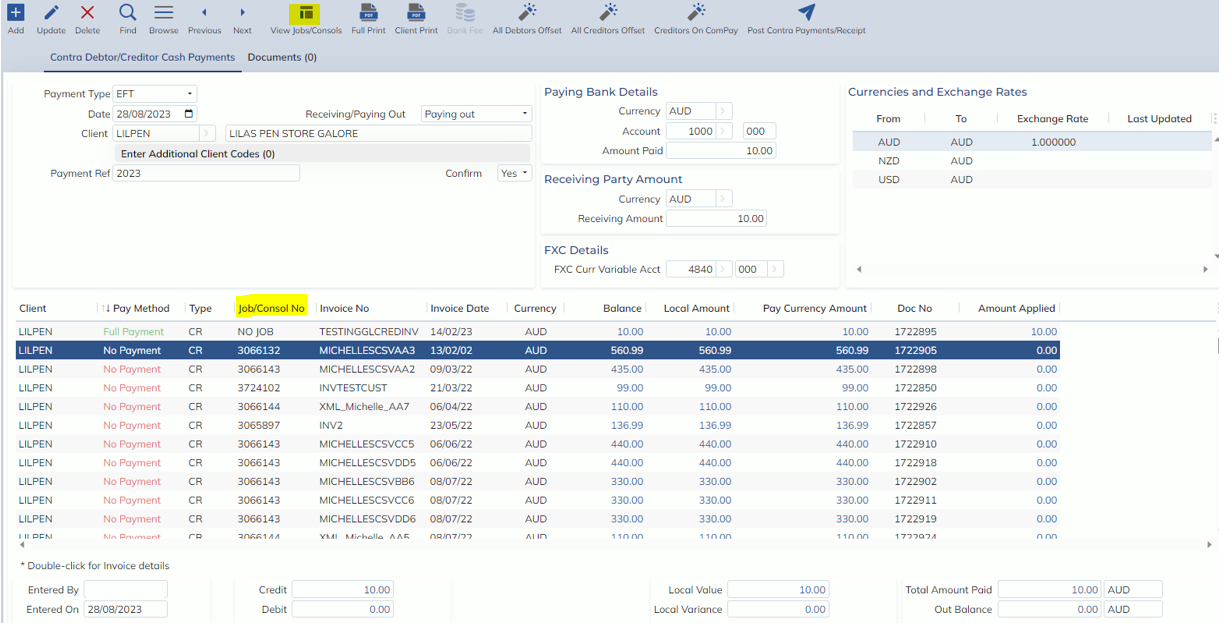
In this release, the Foreign Contra screen has had some cosmetics changes to help make this screen clearer and easier to use.
Firstly, some fields names have been changed to reflect the type of transaction: Receiving or Paying Out.
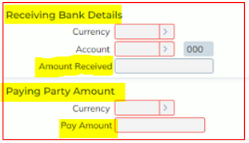
If the transaction is a Receipt:
- Bank Details will become ‘Receiving Bank Details’
- Bank Amount will become ‘Amount Received’.
- Pay Details will become ‘Paying Party Amount’
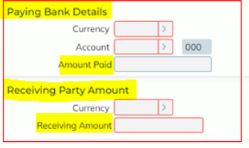
If the transaction is a Payment
- Bank Details will become ‘Paying Bank Details’
- Bank Amount will become ‘Amount Paid’
- Pay Details will become ‘Receiving Party Amount’
- Pay Amount will become ‘Receiving Amount’
There have been the following additions to the screen:
- New column: Job/Consol No
- This new column will display the Job or Consol number against each invoice. If there is no Job/Consol number, this column will display ‘NO JOB’
- Updating all remaining columns to display the full column name – no longer shortened version
- New ‘View Jobs/Consols’ button in top toolbar
- When an invoice is selected, the ‘View Job/Consol’ button will open the Job or Consol record against the invoice
- Additional Clients now has a count increasing visibility when more than one client is entered
- New helpful tooltips on the following columns and fields with formulae:
- NOTE: tooltips are dynamic based on transaction type: Receiving or Paying Out. See Manual for full details
- Pay Currency Amount
- Credit
- Debit
- Local Value
- Local Variance
- Total Amount Paid
- Out of Balance
Please Note: Calculations are performed at a line level and summed together.