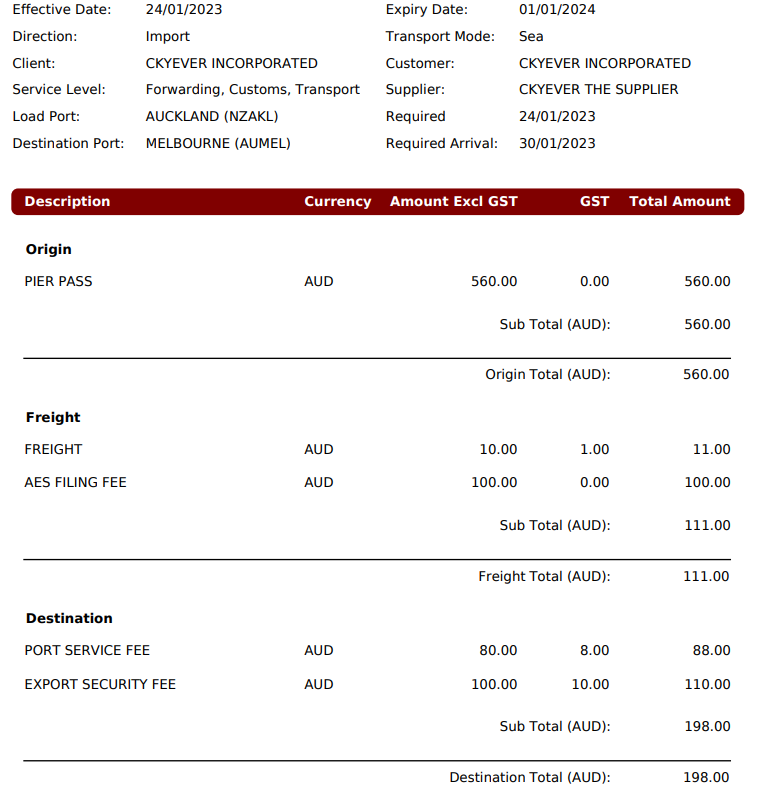
In this release, we have added an additional, mandatory column to the existing Spot Quote (Rates->Spot Quote) Charges tab: ‘Rate Group’.
This column has 3 options: Origin, Freight and Destination.
Example display:
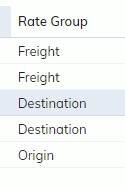
The system will default an option depending on the Alpha Charge Code->Rate Account Code set up.
For example:
If a charge code is set to have the Rate Group ‘Destination’ for Air, Import Jobs/Spot Quotes and ‘Origin’ for Air, Export Jobs/Spot Quotes, the Rate Group column in the Spot Quote’s screen will default to this set up, checking the Direction and Mode (see below).

If there are multiple options set in the Rate Account Codes screen, the system will leave the field blank for the user to select.
NOTE: As this is a mandatory field, users cannot print a Spot Quote without this field entered, as there is a new ‘Rate Group’ Printing Option and Summary Total that requires this field.
This Rate Group can be seen in the Printed Spot Quote in the following ways:
- In the charges Summary printed in the Cover Page
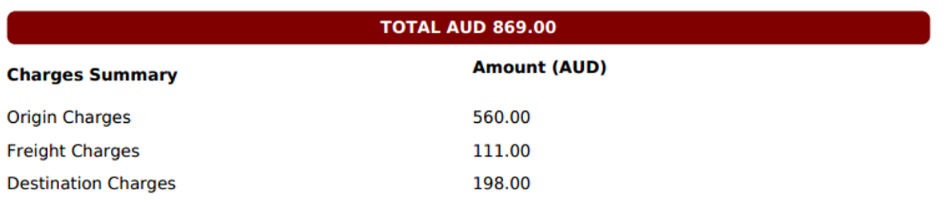
2. Printing Order = Rate Group