In this release, FOB value on Import Declaration N10/20 can be calculated by clicking “FOB Calculator” on Import Declaration.
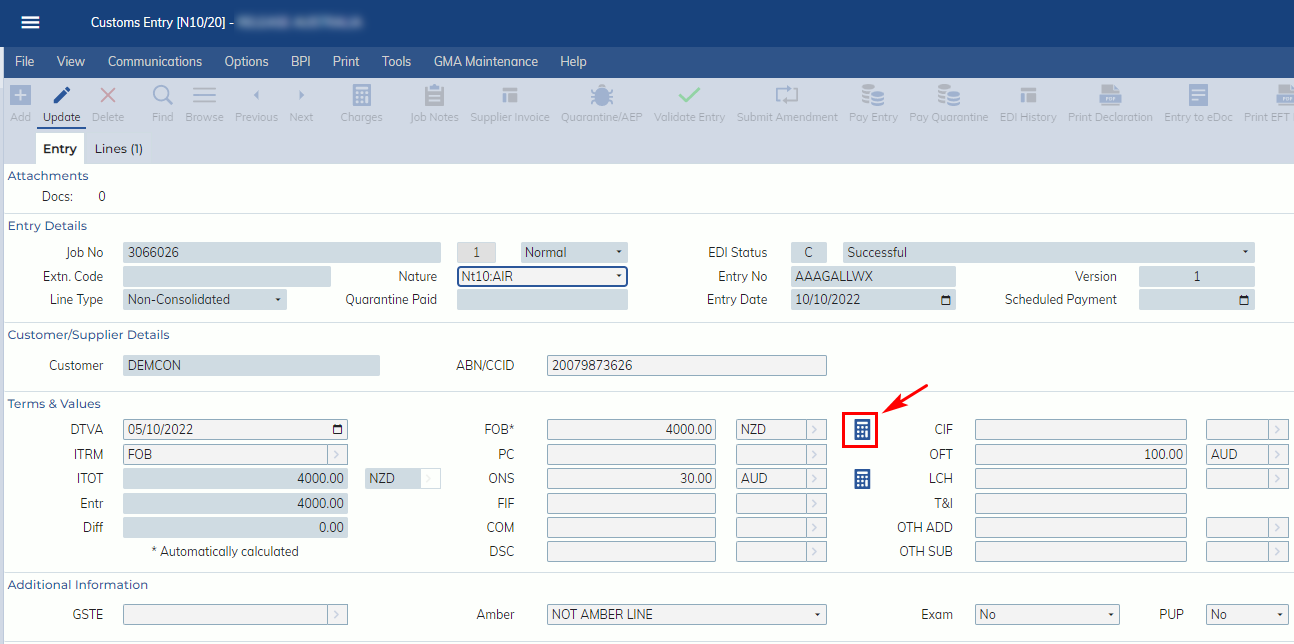
The FOB calculation logic are as below:
- If Invoice Term = EXW, FCA, FAS or FOB then
- FOB = ITOT + (FIF + PC + COM + OTH ADD) – (LCH + DIS + OTH SUB)
- If Invoice Term = CPT or CFR then
- FOB = ITOT + (FIF + PC + COM + OTH ADD) – (OFT+ LCH + DSC + OTH SUB)
- If Invoice Term = CIF, CIP, DES, DEQ, DDU, DAP, DAT, DPU or DDP then
- FOB = ITOT + (FIF + PC + COM + OTH ADD) – (OFT + ONS + LCH + DSC + OTH SUB)
- If all values are under the same currency, the FOB value will be calculated with the same currency as ITOT currency.
- If not all values are under the same currency, the FOB value will be calculated in AUD.
If the site has the auto ONS calculation function, when FOB calculator button is clicked, ONS value will also be calculated based on the current logic.
If the FOB or ONS is an auto calculated value, the label will display *.
