Users can enter TLF into the TLF field in the supplier invoice line screen in this release. After the supplier invoice is saved, new parts will automatically be saved to the part masterfile.
Newly Classified Parts
When users click OK on supplier invoice, if there is any newly classified part, the system will prompt users to save new parts.
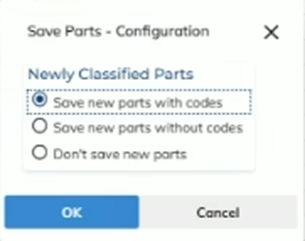
Users have 3 options to choose from. By default, “Save new parts with codes” will be chosen.
- Save new parts with codes
- It allows users to save the parts with part codes from the invoice line.
- Save new parts without codes.
- It allows users to save the parts with TLF only, but will not save any codes from the invoice line.
- Don’t save new parts
- It will not save the new parts to the part Masterfile.
Note: The prompt will only display when new parts are found in the supplier invoice screen. If your site would like to manage the new part classification function at the user level, please contact Expedient support and quote “INLINE_CLASS” system option.
Previously Classified Parts
When users click OK on supplier invoice, the prompt below will display.
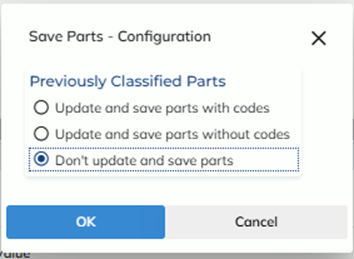
Users have 3 options to choose from. By default, “Don’t update and save parts” will be chosen.
- Update and save parts with codes
- It allows users to update previously classified parts with part codes from the invoice line.
- Update and save without codes.
- It allows users to update the parts with TLF only, but will not update any codes from the invoice line.
- Don’t update and save new parts
- It will not update previously classified parts in the part Masterfile.
Note: The prompt will only be available when the user option “INLINE_TLF” is enabled in the user Masterfile>Options>User Options