Over the last few months and in the next coming months, we had released new or updated financial reports for greater visibility and accuracy of financial positioning. This month, we are releasing the new Profit and Loss report.
What does this report do
This Profit & Loss report shows the financial positioning of the company by breaking down each GL Code by Revenue, Cost and Profit and separating out Expenses. This report can be customized to show user-made groups of GL Codes to see these breakdowns.
Each GL Code (excluding expenses) is made up of the following calculations:
- Revenue
- Cost
- WIP (optional)
- Actual Profit
How to run Profit & Loss report
This report can be accessed here: Finance -> Reports -> General Ledger -> Profit & Loss
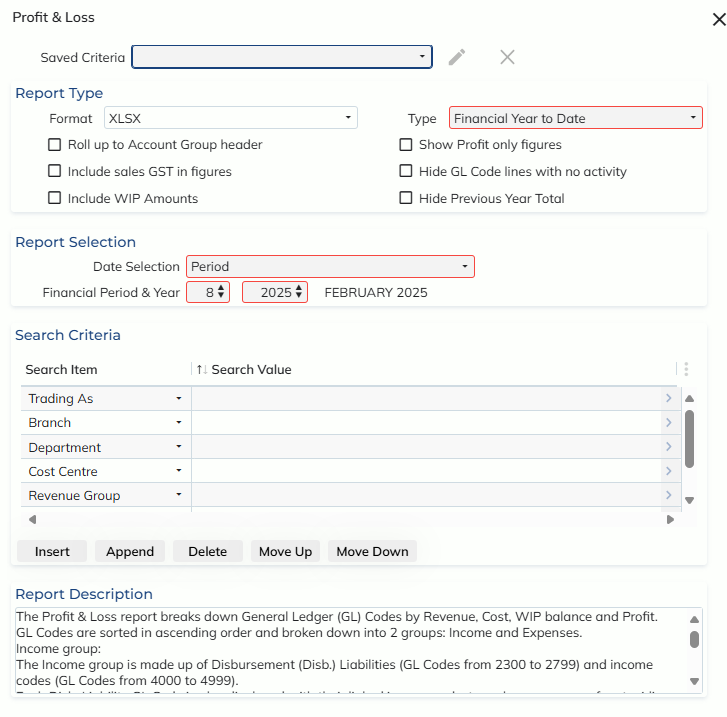
Format:
This report can only be run as an XLSX.
Report Features:
Filters:
Users can save filters of their report configuration to save time when running this report in the future.
Report Types:
- Financial Year to Date
- Breaks down each GL Code by months of the financial year
- Period Comparison
- Breaks down each GL Code by a single period, comparing it to the previous year’s period
Configurable Options:
- Roll up to Account Group header
- Instead of displaying each GL Code, summarise GL Codes based on their Chart of Accounts Group Header
- Include sales GST in figures
- Show values inclusive of their sales GST (found in invoices)
- Income WIP amounts
- For each Disbursement Liability GL Code (GL Codes within range 2300-2799), include a WIP activity breakdown
- Show Profit only figures
- Only show profit amounts in report, make up from income codes (GL Codes within range 4000-4999)
- Hide GL Code lines with no activity
- Do no show GL Codes that have no financial figures against them
- Hie Previous Year Total
- Do not show Previous Year Total comparison column
Report Date Selection:
Users can choose to run either Report Type up to a specific Period selection or Transaction Date
Search Criteria:
Users can make this report more specified by entering report criteria. Example: if they only wish to see figures within a specific branch or department.
How to set up Custom Groups
- Go to the Chart of Accounts
- Select the ‘P & L Account Groups’ from the toolbar
- Enter UPDATE mode
- In the table, enter the following:
- Account Group Name
- This is a unique name of the custom group that will appear in the report
- Enter the Account Group Type
- This is to determine which section of the report this group will belong in and what GL Codes are allowed; either Disbursement Liability/Income (GL Codes within range 2300-2799 + 4000-4999) or Expenses (GL Codes within range 6000-9999)
- GL Code Range
- These are the GL Codes you have specifically chosen to separate out of the main report into this custom group. If the Account Group Type = Disbursement Liability/Income, the available GL Code ranges are 2300-2799 + 4000-4999. If the Account Group Type = Expenses, the available GL Code ranges are 6000-9999.
- Detailed/Summary
- If you would like this group to show the breakdown of each GL Code, set this to Detailed, if you would like this group to only show the totals, set this to Summary.
- Account Group Name
Can I still access the old P/L Reports?
Yes – the old P/L reports are still available within the Legacy folder: Finance -> Reports -> Legacy Reports