In this release, we have implemented a new Debtors – ATB Report, available via the following navigation paths:
- Finance -> Reports -> End of Period -> Debtors ATB – Reports
- Finance -> Reports -> Debtor -> Debtors ATB – Reports
- Operational Finance -> Debtors Reports -> Debtors ATB – Reports
This new report combines the functionality of many of the old ATB Reports:
- ATB – Summary
- ATB – Detailed
- ATB – Foreign Currency Clients
- ATB – Foreign Currency Dept
- ATB – General
- ATB Detailed Disbursements Paid
- ATB Summary – Disbursements Paid
- End of Period Debtors ATB
Which have been moved under the new menu options Finance -> Reports -> Legacy Reports AND Operational Finance -> Debtors Reports -> Legacy
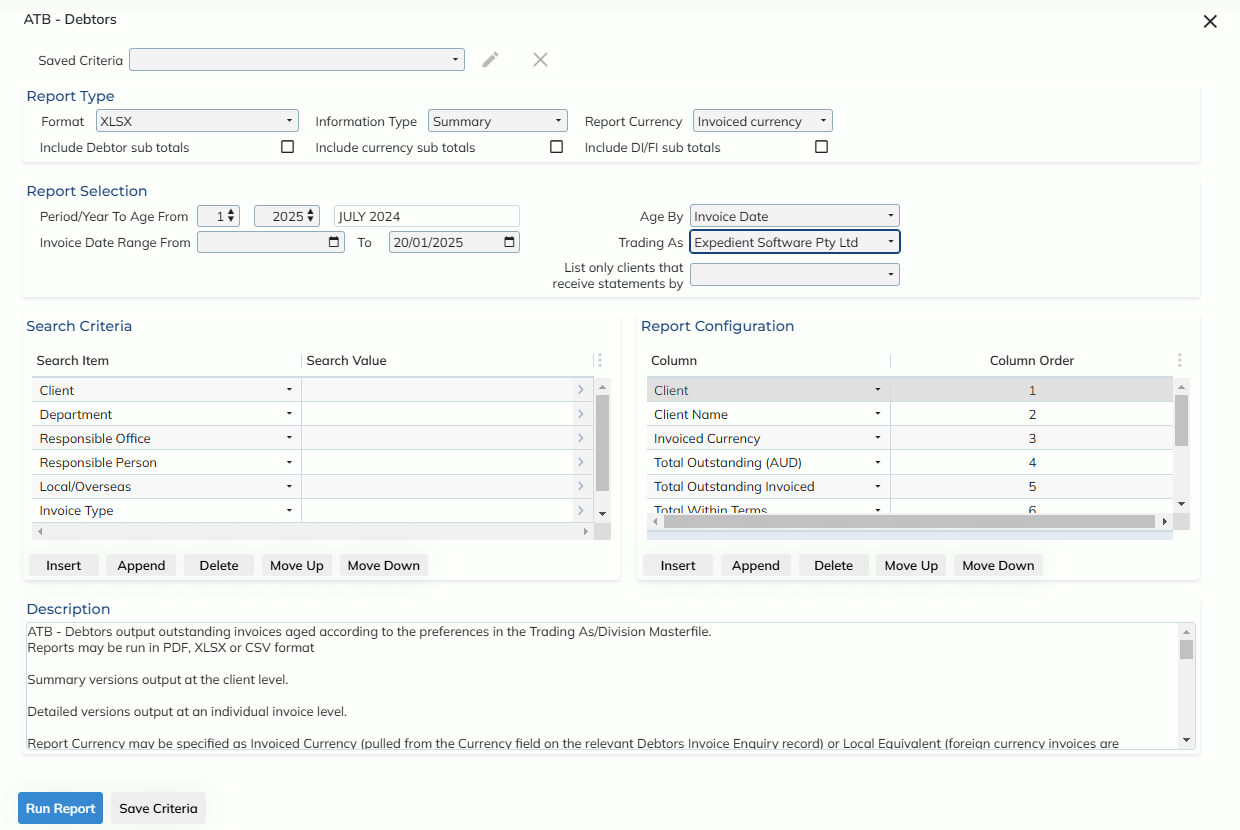
The ATB – Debtors report opens in a modal over the home screen, and allows the user to apply criteria filters so users don’t have to manually enter the criteria each time. Filters may be applied at a private (for only your user) or public (for all users) level.
ATB – Reports may be printed in PDF, XLSX or CSV format
Users are required to select Information Type = Summary or Detailed. Summary versions output at the client level. Detailed versions output at an individual invoice level.
Report Currency may specified as either Invoiced Currency (use the currency as per the invoice) or Local Equivalent (convert any foreign invoices to the local currency)
Sub-totals may be specified via the following check-boxes:
- Include Debtor sub totals
- Tick to include sub-totals for each Debtor
- Include currency sub totals
- Tick to include sub-totals for each unique currency
- Include DI/FI sub totals
- Tick to include subtotals for Disbursement and Final invoices
In the report selection group, users will be required to populate a Period/Year to Age From, for the current period, invoices will be aged from the current date, for previous periods, invoices will be aged from the last day of the selected period.
The Invoice Date Range From/To fields function as a date range for invoices users would like to see on the report, as well as simulating the state of the invoice, as of the selected ‘To’ invoice date
The Trading As field not only filters the report output, but will pull the ageing configuration via the set up in the Client Ageing Options tab of the Administration -> Corporate -> Company Details -> Trading As/Division Masterfile screen.
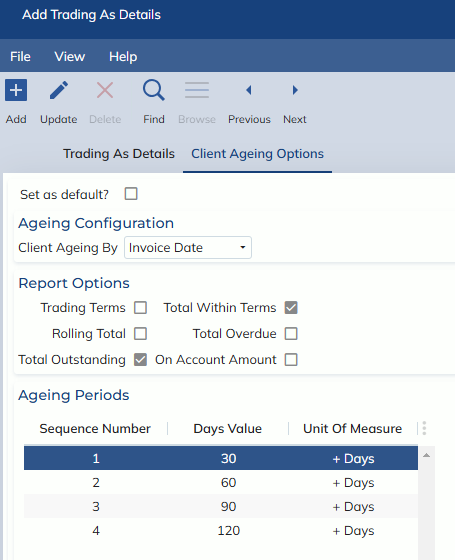
Invoices may now be aged from the invoice date or the invoice due date.
Client output may be filtered based on the method they receive statements by (Print/Email/Batch Email), based on the set-up in the Debtor tab of the relevant Customer Masterfile record.
Criteria may be applied in the Search Criteria group, each zoom contains multi-select functionality, so users may run for multiple selections (e.g. multiple clients)
The Report Configuration group allows users to specify the columns they would like to appear on the report. These options differ depending on the Information Type selection (Detailed or Summary)
XLSX and CSV reports will be able to contain as many columns as the user would like. As PDF columns are space limited, each column has been given a percentage allocation, indicating how much of the report they take up (this may be edited to the users preference), when capacity is >100%, the report cannot be run in PDF format.
For more detailed information on this report, please refer to the Debtors user manual