In this release, we have made significant enhancements to the Client Statement report.
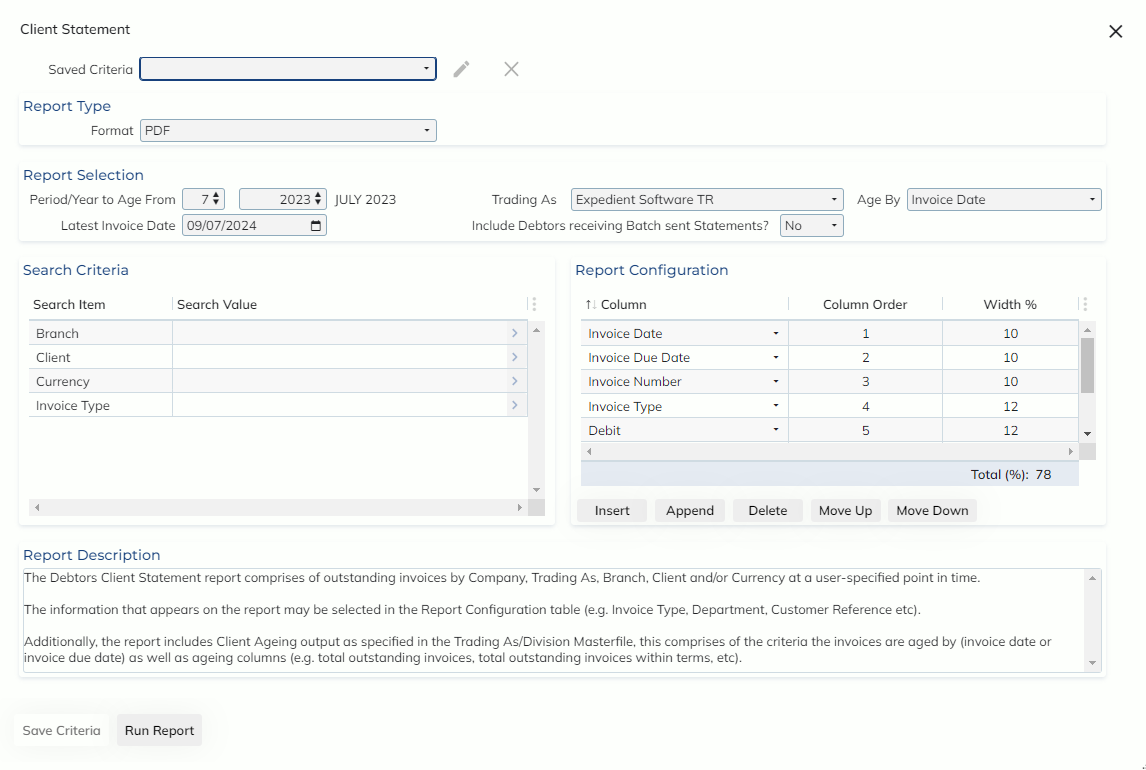
The Client Statement report now opens in a modal over the home screen, and allows the user to apply criteria filters so users don’t have to manually enter the criteria each time. Filters may be applied at a private (for only your user) or public (for all users) level.
The Client Statement may now be printed in PDF and XLS format.
In the report selection group, users will be required to populate a Period/Year to Age From, for the current period, invoices will be aged from the current date, for previous periods, invoices will be aged from the last day of the selected period.
The Latest Invoice Date field functions as cut off date for invoices users would like to see on the report, simulating the state of the invoices up to the selected date.
The Trading As field not only filters the report output, but will pull the ageing configuration via the set up in the Client Ageing Options tab of the Administration -> Corporate -> Company Details -> Trading As/Division Masterfile screen. If no Trading As is applied, the report will use the ageing from the Trading As record with the Set as default? checkbox ticked
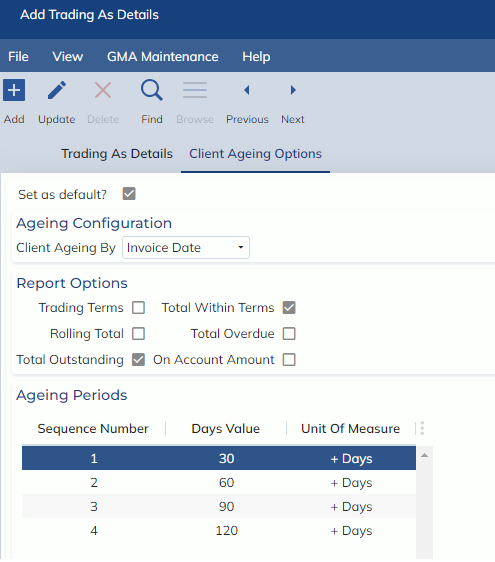
Invoices may now be aged from the invoice date or the invoice due date.
We have added the additional criteria of Invoice Type, and have merged the functionality from the End of Period Statement Analysis report, to provide the option to include debtors receiving batch sent statements or not.
The Report Configuration group allows users to specify the columns they would like to appear on the report.
We have added a number of new columns:
- House Bill
- Master Bill
- Job Number
- Customer Reference
- Supplier/Consignee
- Transport Mode
- Direction
- Rolling Total
XLS reports will be able to contain as many columns as the user would like. As PDF columns are space limited, each column has been given a percentage allocation, indicating how much of the report they take up, when capacity is >100%, the client statement report cannot be run in PDF format.
The old Client Statement and End of Period Statement Analysis reports may still be accessed under the menu options:
- Finance -> Reports -> Legacy Reports -> Legacy Client Statement
- Finance -> Reports -> Legacy Reports -> Legacy End of Period Statement Analysis