In this release, we have added a new tab to the Corporate -> Company Details -> Trading As/Division Masterfile screen ‘Client Ageing Options’
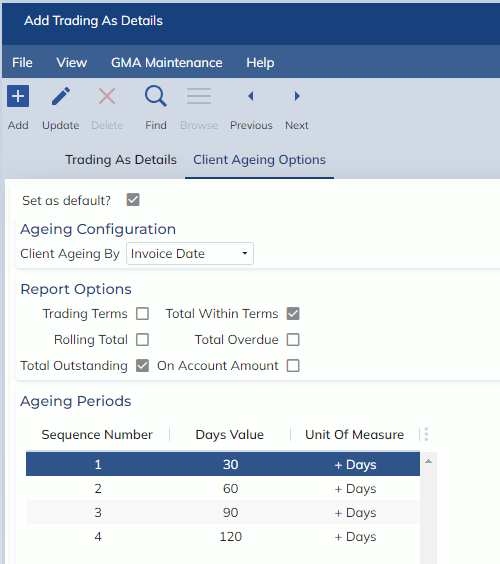
The Client Ageing Options tab determines which ageing columns will appear on the following reports and screens:
- Debtors Ageing Screen
- Client Statement – Report
- Batch Send EOM Statements – Report (coming soon)
- Debtors ATB – Report (coming soon)
For each report and screen the output columns and age by criteria will default as per the configuration for the Trading As. When selecting PDF for the reports, the visible columns will be limited based on what can fit onto the PDF document. Formats such as XLS and CSV are not restricted and can apply all visible columns. The Debtor Ageing screen will be limited to 10 ageing columns.
Definitions of Options:
Trading Terms
Ticking this check-box will output the Invoice Payment terms from the Debtor tab of the Customer Masterfile for each Client on the above reports.
Rolling Total
Ticking this check-box will output a Rolling Total column on the above reports, this is a column that cumulatively adds the preceding total row in each new row.
Total Outstanding
Ticking this check-box will output a Total Outstanding column on the above reports, this column shows the Total Outstanding amount for the client.
Total Within Terms
Ticking the Total Within Terms check-box will output a Total Within Terms column on the above reports, this column shows the Total Outstanding amount for the client where the invoice due date has not passed.
Total Overdue
Ticking the Total Overdue check-box will output a Total Overdue column on the above reports, this column shows the Total Outstanding amount for the client where the invoice due date has passed
On Account Amount
Ticking this check-box will output the On Account Amount from the Debtor tab of the Customer Masterfile screen for each client on the above reports