In this release, we have enhanced the Spot Quote screen’s capabilities to now allow auto-rating. (Spot Quote screen location: Rates -> Spot Quote)
Auto-Rating will work the same way the Job Registration screens currently do, matching against the criteria entered in the Customer Rates, Company Tariff and Cost Tariff screens.
Ao Auto-Rate against a Spot Quote:
- Ensure you are in UPDATE mode
- Make sure all relevant Additional Information fields are entered
- Select the new option menu: Charges
- Select one of the new Auto-Rating buttons
- NOTE: Export Spot Quotes cannot use Auto-Rate Forwarding or Customs

Notable differences:
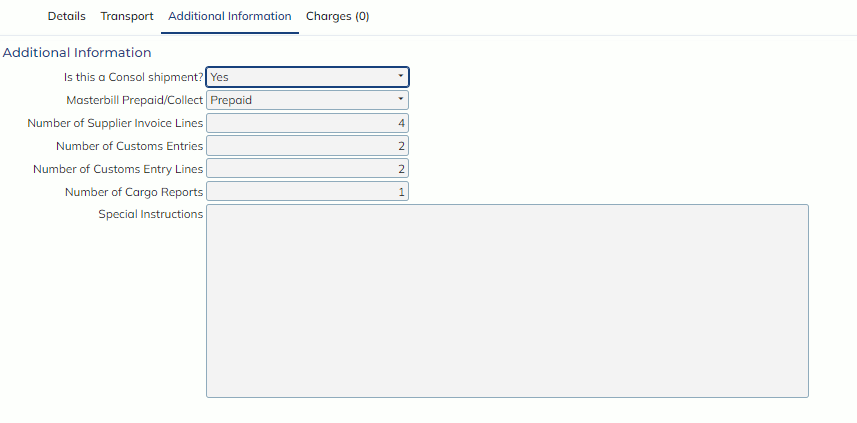
As Spot Quotes are made well before a Job may be scheduled or created, certain fields or criteria that the Job’s use to auto-rate are not available on the organically, for example, whether the Masterbill is Prepaid or Collect or if the Job (Spot Quote) is against a Consol.
To accommodate for these differences, to Auto-Rate properly with all scenarios and criteria accounted for, be sure to check out the Additional Information tab to see specific fields for Auto-Rating.
Specific differences:
- Auto-Rating will use the Client field, not the Customer
- As the Spot Quote screen does not have ETD and ETA date fields, Auto-Rating will use the Required Departure and Required Arrival dates
- For Import Spot Quotes, to use the Auto-Rate Forwarding and Auto-Rate Customs functions, the Service Type field must have Forwarding and Customs selected, in addition to having the Receiving Agent and Broker populated with a Customer Record that is configured as ‘Own Company’ in the Customer Masterfile