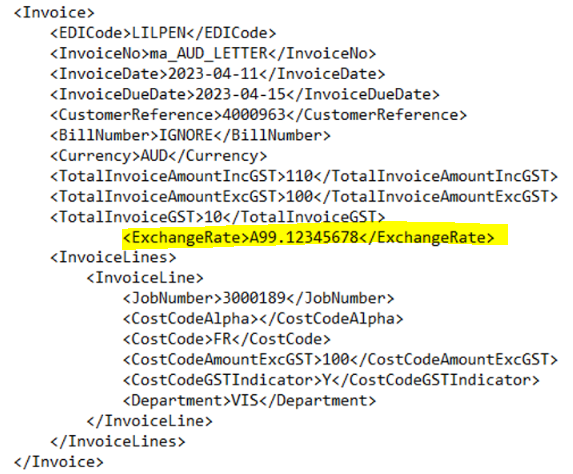
In this release, the Creditor Invoice EDI process has been updated to allow a new ‘Exchange Rate’ column/field to be included in the XML and CSV files allowing exchange rates to be populated directly from file to invoice.
To start using Exchange Rates from the loaded EDI files, the ‘Applied Exchange Rate’ field in the Customer Masterfile->Creditor tab will need to be set to the new option, ‘Rate in File’. Once this is set, including Exchange Rates in the EDI file will be mandatory.
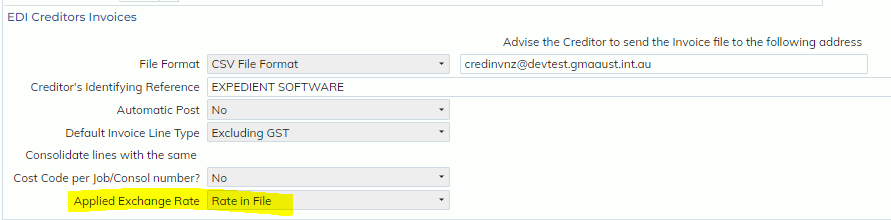
If an Exchange Rate in the file is invalid (e.g. larger than 10000.00 or smaller than 0.0000001), an email will be sent to internal contacts alerting them of this error. The Applied Exchange Rate option ‘Date of Invoice’ will be used to determine the Exchange Rate instead.
NOTE: When invoice currency is the system local currency, Exchange Rate will always = 1.0000.
Field Specifications:
Length: 12,8
CSV Column name: Exchange Rate
XML Field tag: ExchangeRate
NOTE: This new Exchange Rate from file option is only available for File Formats: CSV and XML.
When File Format = CSV
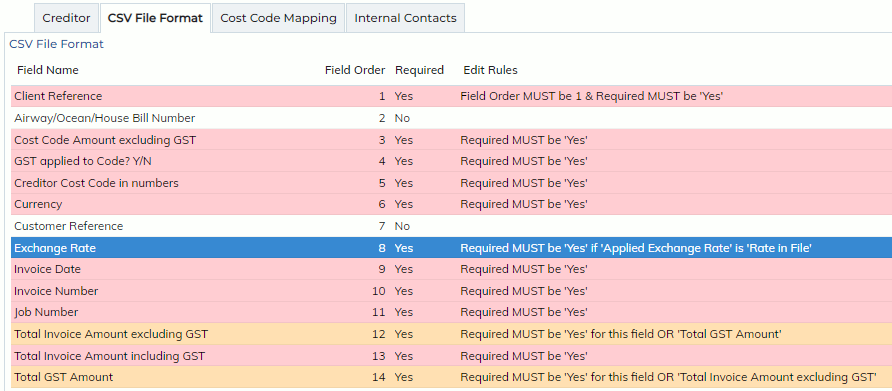
For users currently using the Creditor EDI process, the new Exchange Rate column has been appended to the end of their current set up, as the 14th column and not required. (This is to not disrupt current processes).
For new customers who are setting up Creditor EDI for the first time, the new Exchange Rate column will be the 8th column.
When File Format = XML
Users can add the new Exchange Rate tab in the below format.