This release enables users to automatically load supplier invoice data via EDI directly into the Supplier Invoice screen.
How to configure
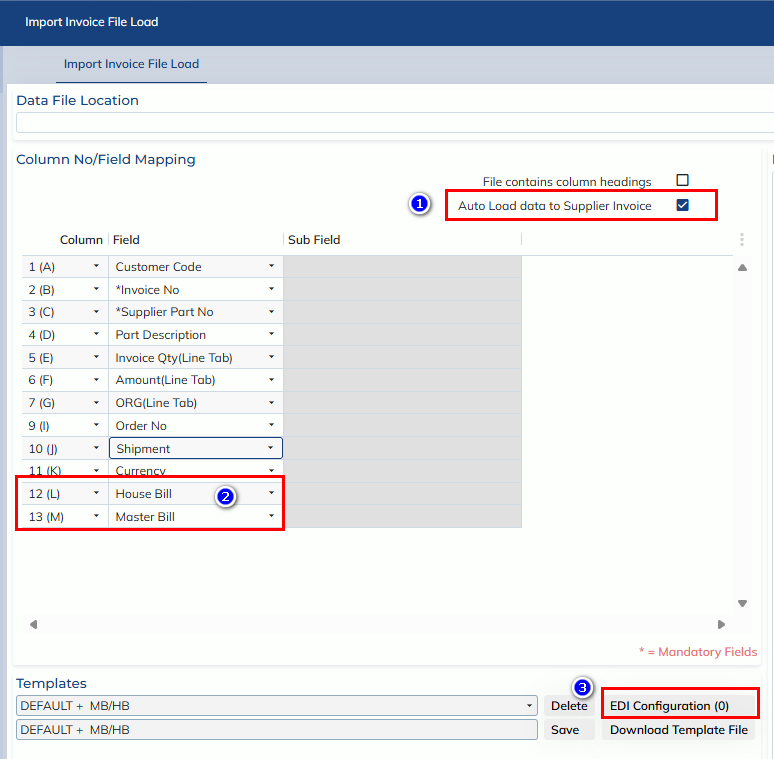
- Go to Customs Processing -> Tools -> Supplier Invoice File Load
- Create or configure a Template:
- Tick the “Auto Load data to Supplier Invoice” Option.
- Ensure the following fields are properly mapped:
-
House Bill
-
Master Bill
-
- Set up EDI Configuration.
How it works
- The system automatically loads invoice data into the Supplier Invoice screen
-
Matching is based on:
- House Bill
- Master Bill
within the corresponding Job
-
Important Note
-
✅ A valid Customer Code must be assigned to the Job
- If missing, invoice data will not load until it is added
-
✅ If an Invoice Number already exists, the system will:
- Skip the record
- Not overwrite or update existing invoices