In this release, we added a new auto-rating method ‘Customs Value Breaks’.
This new method is available on all tabs except for the Air Freight tab, on all the auto-rating screens:
– Company Tariff Rates
– Customer Rates
– Cost Tariff
– Global Update – Company Tariff Rates
– Global Update – Customer Rates
– Global Update – Cost Tariff
– Customer Quotes
- The method compares the customs value of the job, against the breaks set up and applies a flat amount.
The customs value is validated against the following fields:
AU Sites- CVAL field on the Customs Processing -> Import Declaration Nature 10/20
- Total FOB on Forwarding -> Export Air -> Export Declaration
- Total FOB on Forwarding -> Export Sea -> Export Declaration
- NZ Sites
- Customs Processing -> Import Declaration -> Declaration Lines tab
- Total of Customs Value ($NZ) column
- Forwarding -> Export Air -> Export Declaration -> Declaration Lines tab
- Total of the Customs Value ($NZ) column
- Forwarding -> Export Sea -> Export Declaration -> Declaration Lines tab
- Total of the Customs Value ($NZ) column
- Customs Processing -> Import Declaration -> Declaration Lines tab
E.g.
If I am on an AU Site, and my import declaration has a CVAL of $3000.00
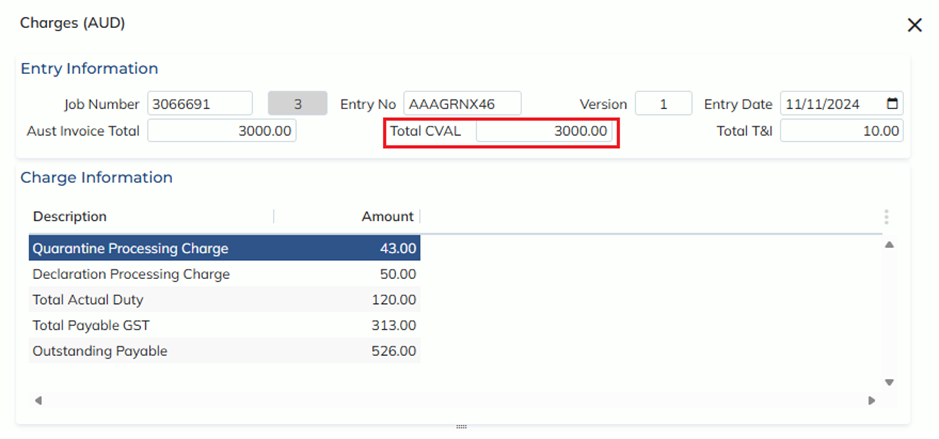
And my breaks are set up as per the below:

When I auto-rate, I will pull through $200.00, as this was my break if the customs value was greater than or equal to $3000.00
