25/03/2026 – Rates – Air Breaks updated to include KG/CBM selection and conversion factor for Auto-Rating
In this release, we have enhanced the Air Breaks section on the Air Freight tab on the following screens:
- Rates -> Company Tariff Rates
- Rates -> Customer Rates
- Rates -> Buy Rates -> Cost Tariff
To include the following new fields:
- Flat/Per Unit
- Combo-box with the following options:
- Flat
- Per Unit
- KG – CBM
- Combo-box with the following options:
- Cubic Metres
- Chargeable KG’s
- Actual KG’s
- Combo-box with the following options:
- Combo-box with the following options:
- Convert Factor
- Number only field
When Flat is selected, the charge amount applied will be a flat value, based on which weight break the job falls into
E.g.
If my Air Breaks are set up as per the below
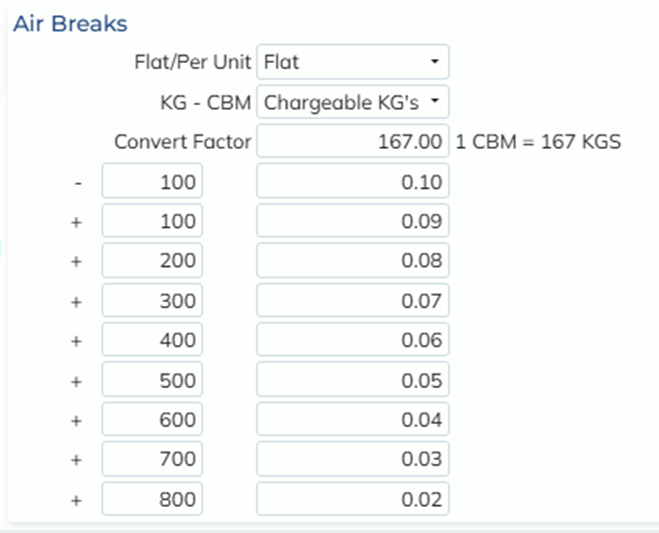
And my job has a Chargeable Weight of 150KG, this falls into the second break so the charge would calculate as a flat amount of $0.09
If my Flat/Per Unit was set as Per Unit for the same scenario, the charge would be 150*$0.09 for a final amount of $13.50
The Convert Factor is used when the KG – CBM field is set to ‘Cubic Metres’ to convert weight into volume, so the breaks can be applied.
E.g.
If my job has a Chargeable Weight of 1000KG and my convert factor is 167, the system will do 1000/167 = 5.988 to calculate the volume, and then compare to the breaks from there.