In this release, we have updated the part of the Bank Reconciliation process to include events.
When a transaction is reconciled against a statement in the Bank Reconciliation screen, a ‘REC’ event will be triggered against the transaction. Similarly, when a transaction is unreconciled, an ‘UNREC’ event will be triggered.
These events can be found in the following screens:
- Payments Enquiry (Finance -> Banking -> Enquiry -> Bank Reconciliation Enquiry)
- Reference column = Doc No of Bank Reconciliation Enquiry record
- Receipts Enquiry (Finance -> Banking -> Enquiry -> Receipts Enquiry)
- Reference column = Doc No of Bank Reconciliation Enquiry record
- Bank Reconciliation Enquiry (Finance -> Banking -> Enquiry -> Bank Reconciliation Enquiry)
- Reference column = Doc No of Payments/Receipts Enquiry record
- Note: in this release, we have changed the name of this screen from ‘Query Posted Items’
- Reference column = Doc No of Payments/Receipts Enquiry record

REC or UNREC events are triggered with an Event Note of the bank account’s current GL Balance, Unreconciled Entries, Not Entered & Statement Balance information.
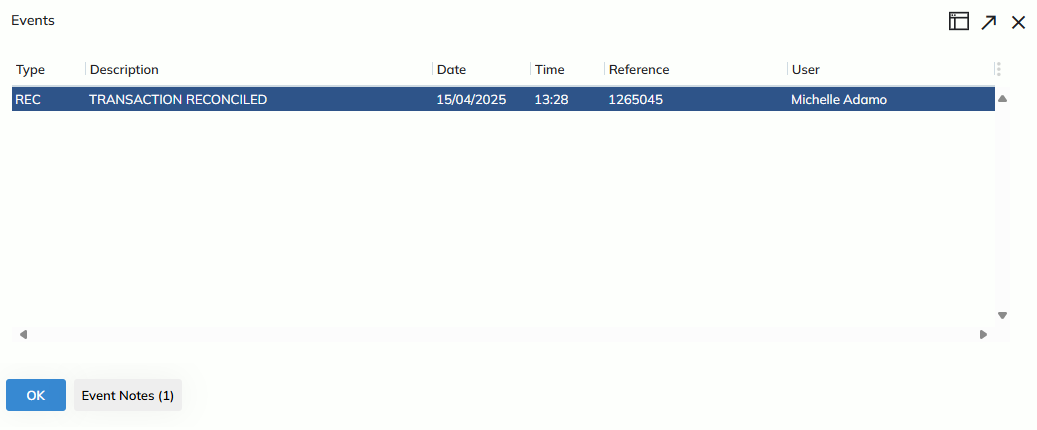
Please Note: Only new reconciliations will have an event triggered; previous transactions that were reconciled before this release will not have a REC or UNREC event for previous activity.