In this release, users are allowed to reset EDI Messages if the submission is stuck with “Being Submitted”. After EDI reset, users are allowed to submit the message again.
The EDI reset is only visible to users with User Option “RESET_EDI” ticked in User Master file>Options>User Options
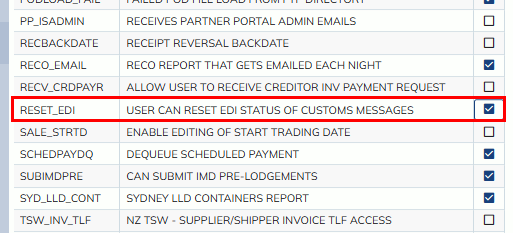
If users are allowed to reset EDI, they can find the “Reset EDI Status” button on the following menu options.
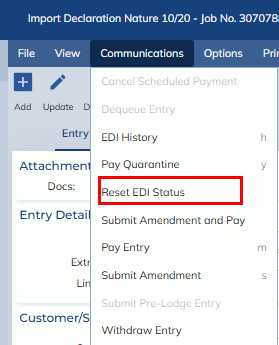
- Customs Processing -> Import Declaration Nature 10/20 ->Communications
- Customs Processing -> Import Declaration Nature 30 ->Communications
- Forwarding -> Import Air -> Cargo Reporting – Customs -> Air Cargo Reporting – HAWB ->Communications
- The air cargo reports can be mass reset. Please go to Import Air Consol>Customs>Reset EDI Status
- Forwarding -> Import Sea -> Cargo Reporting – Customs -> Sea Cargo Reporting – HB ->Communications
- The sea cargo reports can be mass reset. Please go to Import Sea Consol>Customs>Reset EDI Status
- Forwarding -> Import Air -> Outturn/Manifest Check-In ->Communications
- Forwarding -> Import Air -> Co-Loader Outturn ->Communications
- Forwarding -> Import Air -> Cargo Reporting – Customs -> Air Cargo Reporting – HAWB -> House Outturn ->Communications
- Forwarding -> CFS -> Sea CFS -> Vessels Status (Sea Outturn) ->Communications
- Forwarding -> Import Air/Sea -> Consol Registration -> Master Underbond ->Communications
- Forwarding -> Import Air -> Job Registration -> Customs -> Underbond Request ->Communications
- Forwarding -> Import Air -> Cargo Reporting – Customs -> Air Cargo Reporting – HAWB -> House Underbond ->Communications
- Forwarding -> Import Sea -> Cargo Reporting – Customs -> Sea Cargo Reporting – HB -> Options -> Underbond House Move ->Communications
- Forwarding -> Export Air -> Export Declaration ->Communications
- Forwarding -> Export Air -> ESM ->Communications
- Administration -> Masterfile Management -> Customer Masterfile -> Customs -> Register Client in ICS ->Communications
The EDI Reset Process
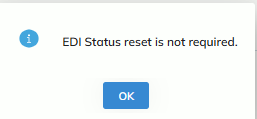
- The process only allows users to reset EDI Status 4 hours after the submission, otherwise, the following prompt will display.
-
- The process only allows users to reset EDI Status, when the EDI status is “Being Submitted”.
- If the EDI Status is “In Progress”, the following prompt will display.
-
- If the submission was withdrawn, the following prompt will display.
-
- If the EDI Status is others (e.g. Failed, Submitted etc.), the following prompt will display
-
- If the EDI Status is “In Progress”, the following prompt will display.
- Before the EDI status is reset, the process will display the following prompt to ensure that the user understands the consequence of reset.
-

- If Yes is clicked, the process will display the following prompt to confirm EDI status is successfully reset.
-
- If Yes is clicked, the process will display the following prompt to confirm EDI status is successfully reset.
-
- If the record was submitted previously, the EDI status will be reset to “Submitted but Modified”. If the record has not been submitted previously, the EDI status will be reset to “Not Submitted”.
- If EDI Status is successfully reset, a “REDI” event will be updated in the system.
-