In this release, we have made significant enhancements to the G/L Trial Balance report.
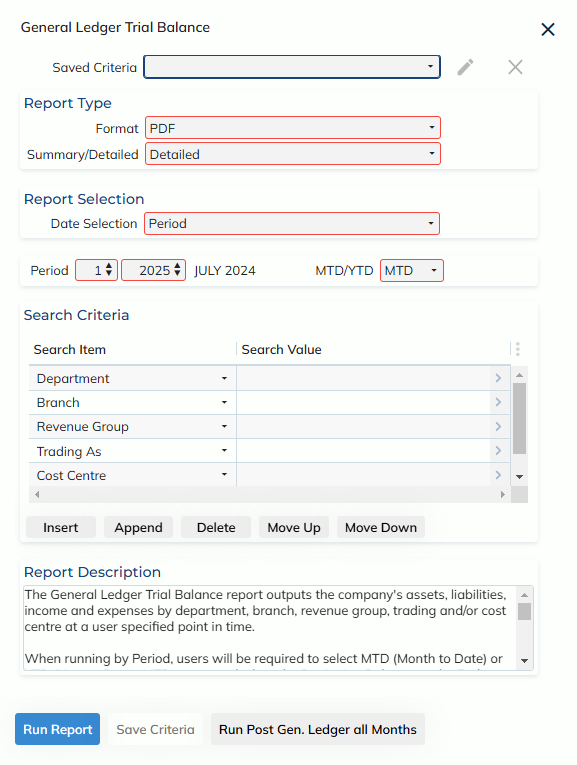
The G/L Trial Balance report now opens in a modal over the home screen, and allows the user to apply criteria filters so users don’t have to manually enter the criteria each time. Filters may be applied at a private (for only your user) or public (for all users) level.
We have added the additional criteria of Branch, Revenue Group, Trading As & Cost Centre to run the Trial Balance report by. Each criteria field is a zoom with multi-select functionality.
Users may now run the Trial Balance report by period, or transaction date range
When running by Period, users will be required to select MTD (Month to Date) or YTD (Year to Date). MTD reports calculate the Beginning Balance as the Ending Balance of the previous period. YTD reports calculate the Beginning Balance as the Ending Balance of the previous financial year.
Summary reports display the figures by Account Number, whereas Detailed reports split each Account Number up by Department
When run in XLSX an additional check-box will appear – ‘Show transaction details’. if ticked the report will generate with the General Ledger Trial Balance, plus additional tabs. Each additional tab will outline the details of each transaction that makes up the Trial Balance amounts.
If unticked, only the General Ledger Trial Balance will appear without the additional detailed tabs.
The old Trial Balance report remains available under the new navigation path Finance -> Reports -> Legacy Reports -> Legacy G/L – Trial Balance