In this release, we have updated the Bank Reconciliation screen, making it easier than ever to see and access tagged Expedient transactions against Bank Statement lines.
The most noticeable change is the colour- uploaded Bank Statement lines will now appear grey, and Expedient transaction has been tagged against it, will be white.
Users will now be able to quickly expand or collapse statement lines to immediately see tagged transactions, reducing errors made by a lack of visibility.
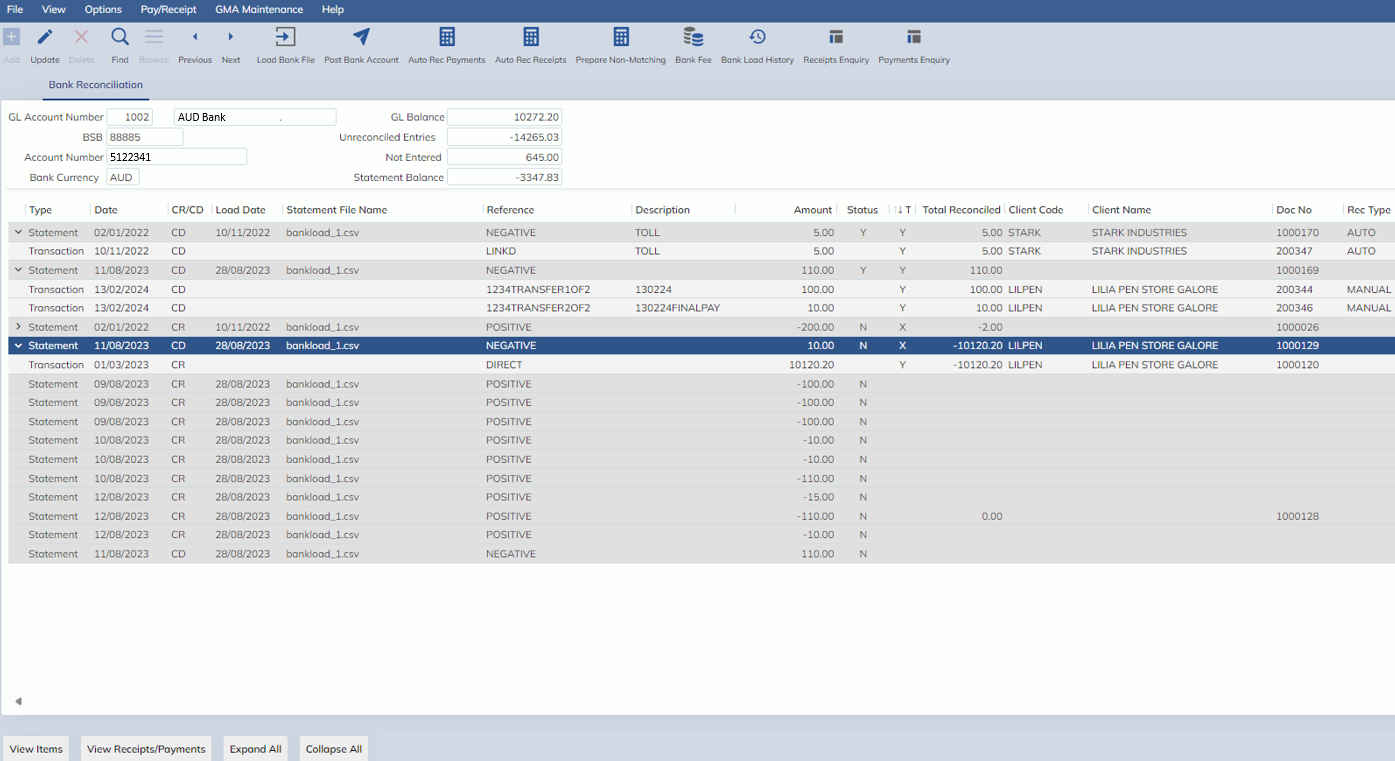
In addition, the following new columns have been added, to further increase visibility:
- Expand/Collapse function
- When a transaction has been tagged against a statement line, an arrow icon will appear here (see above)
- This icon can be selected to expand the statement line and see exactly which Expedient entered transactions have been tagged against it.
- Type
- This identifies whether a line is a statement line or a tagged Expedient transaction
- Load Date
- This is the date the Bank Statement file was uploaded into Expedient
- Statement File
- This is the file name of the Bank Statement that was uploaded into Expedient
- Description
- This is the Description of any tagged transaction against the statement
- Total Reconciled
- This is the sum of all tagged transaction lines against the statement line
- Client Code/Name
- This is the Debtor/Creditor of the tagged transaction
- Rec Type
- This indicator shows whether a statement line was tagged either manually or through the auto-reconcile buttons
- This indicator shows whether a statement line was tagged either manually or through the auto-reconcile buttons