In this release, we have enhanced the Debtor Receipts screen to now allow the easy adding of Bank Fees.
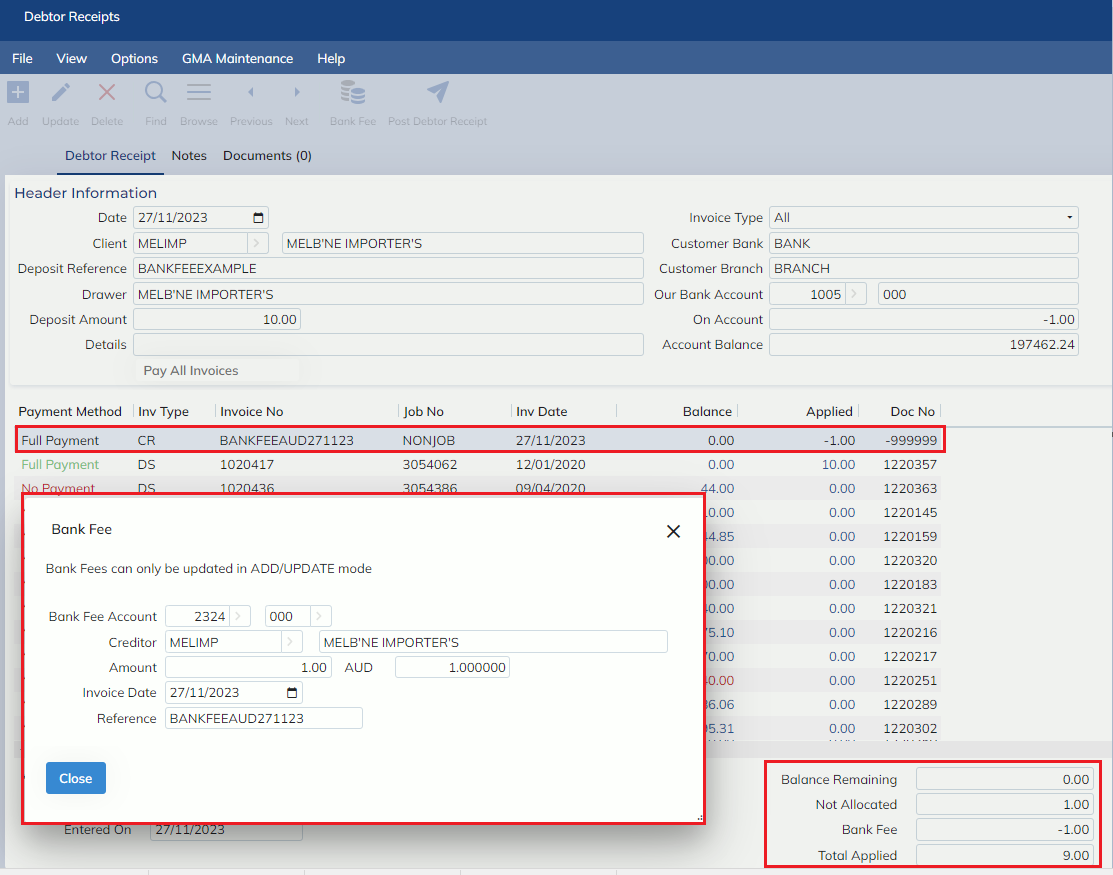
The Debtor Receipts screen has a new button in the toolbar called ‘Bank Fee’.
Selecting this button will allow users to add a bank fee. This will automatically create and pay a new GL Creditor Invoice using the details applied in the new Bank Fees modal
When a Bank Fee is added to a Receipt, a greyed out, non-editable invoice line, representing the Bank Fee will be inserted into the invoice list.
NOTE: If this Receipt record is deleted, no Bank Fee invoice will be created.
Bank Fees will be applied against the GL Code entered in the modal
NOTE: Only GL Codes that have been configured in the Chart of Accounts with ‘Bank Fee = YES’ will be available in the Bank Fees modal.
In addition to keep, to keep track of totals, a new Bank Fees total has been added to the bottom right of the screen, and the existing ‘Total Applied’ has been updated to include any bank fees also.
For more details, please see the Banking manual.