In this release, we have added functionality that allows users to change the department code of a consol with linked jobs.
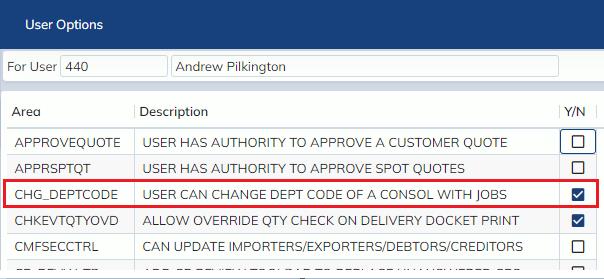
The new functionality is limited via a user option, to give users access the new functionality, go to your desired user’s User Masterfile record (Administration -> Corporate -> Users Masterfile), and on the top menu go to Options -> User Options and tick the Y/N checkbox for ‘CHG_DEPTCODE’)
Note that financial restrictions to changing department codes still exist. Changing the Department code of a consol with attached jobs will not change the department code of attached jobs that have any of the following financials posted against them:
- Debtor invoice
- Creditor invoice
- Disbursement Payment
- Disbursement Cheque
- Journal